



Securing Your Data: Understanding SSL Certificates and HTTPS!
Have you ever paid for a domain name and the registrar offered you a free SSL certificate with your purchase?
If the answer is “yes,” the freebie may have left you wondering what an SSL certificate is and why you need one. As you’ll soon learn, installing an SSL certificate for your website is incredibly important, especially if your site collects data from users.
This article will answer all your questions about SSL certificates, including the available types, why you need one, and how to install one on your website.
Let’s jump in.
What’s an SSL certificate?
The “SSL” in “SSL certificate” stands for “secure sockets layer.” It’s an encryption protocol that signifies that the connection between a browser and server has a higher level of security. Translation please? Here’s the plain English version:
Most internet users’ activity falls into two categories when they surf the web: asking for (and receiving) information, or sending it. When they do either of these, a back-and-forth occurs between their browser (Google Chrome, Firefox, etc.) and the server that hosts the websites they visit.
SSL certificates make this exchange safer. These small data files establish a security protocol between your browser and the servers they send data to and receive data from.
When you visit a website and want to know if it has an SSL certificate, look to your browser’s address bar. If you see a padlock icon before the site’s URL, then it has an SSL certificate.
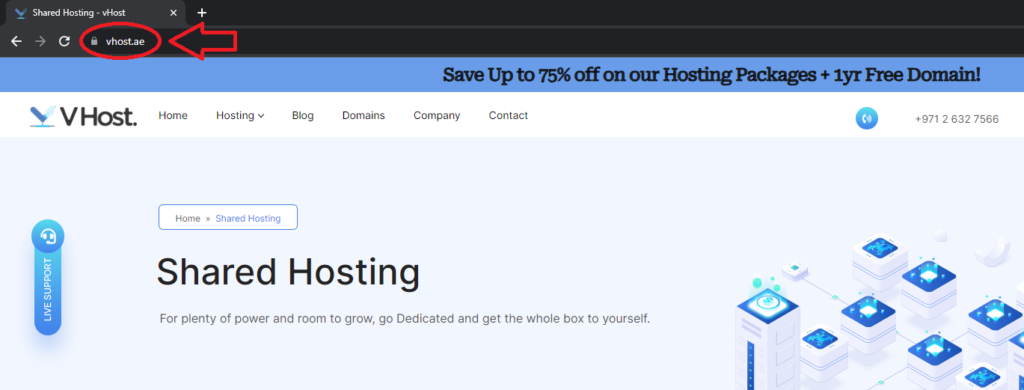
Also, the site’s URL will begin with “https” instead of “http,” with the “s” standing for secure (it’s the secure version of hypertext transfer protocol). These two indicators point to a website that keeps user data secure (as below).
What information does an SSL certificate contain?
SSL certificates contain the following information:
- The domain name that the certificate is meant to protect (usually this is your business name or something close to it).
- The certificate recipient (i.e., the domain owner or device the certificate was issued to).
- Subdomains associated with the domain.
- The certificate issuer (i.e., the Certificate Authority).
- The certificate issuer’s digital signature.
- The certificate’s date of issue.
- The certificate’s expiry date.
- The SSL certificate’s public key (which is a long text string).
What are public keys? To answer that question, we’ll need to understand how SSL works.
How does SSL work?
In a nutshell, encryption algorithms form the backbone of SSL and SSL certificates. These algorithms ensure data transferred between a browser and server is unreadable by scrambling it during transfer.
Everything from names, addresses, passwords, credit card details, and other sensitive data becomes a jumbled mess of characters when sent over a secure connection. The process prevents hackers from stealing such information.
A typical data exchange on a secure connection goes as follows:
- Your visitor’s browser attempts to connect to your secure website.
- Their browser requests the web server serving your website identify itself.
- The web server responds with a copy of your website’s SSL certificate.
- Your visitor’s browser examines the SSL certificate and decides whether to trust it or not.
- If your visitor’s browser trusts the certificate, it’ll signal its trust to the web server.
- The web server will respond by sending a signed acknowledgment to commence an encrypted session.
- The browser and server share the encrypted information.
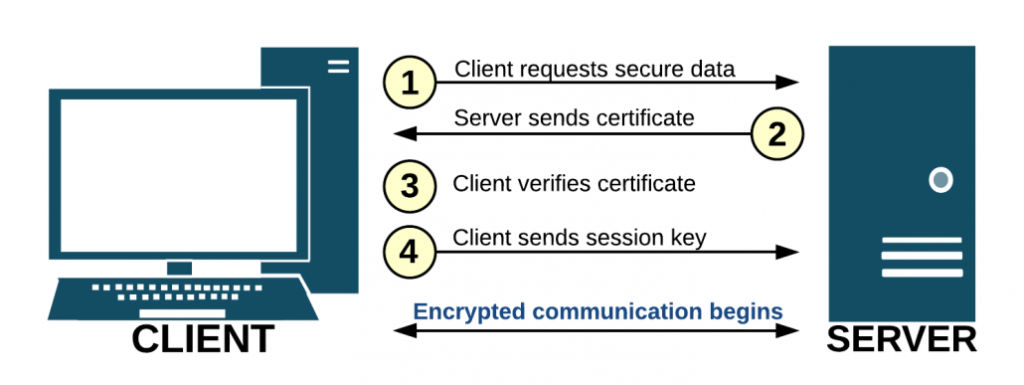
It may sound like a lot (and it is), but the entire exchange described above happens within milliseconds.
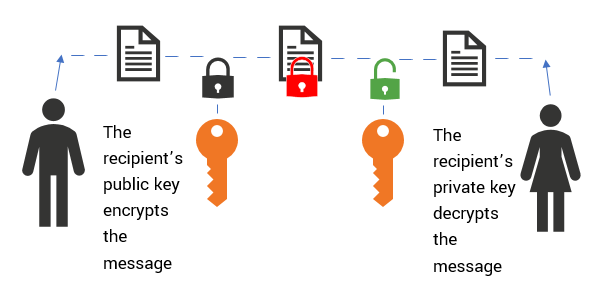
However, the most crucial component of the exchange is the use of SSL keys. SSL certificates have private and public keys that browsers and web servers use to encrypt and decrypt data. The transferred data is encrypted and verified using the sender’s public key.
Why are SSL certificates important?
There are several reasons why your website needs an SSL certificate. The most crucial reasons include:
1. Security
Online businesses and websites that ask their users for their personal information need SSL certificates.
The web has evolved such that businesses now store sensitive information like medical records and social security details online. That data represents a treasure trove for cybercriminals and identity theft perpetrators hunting for websites with lax security standards. And, as the infographic below shows, it will only get worse.
SSL certificates ensure everything from login credentials to online transactions remain private and safe from spoofing, phishing, and other kinds of attacks.
Also, SSL certificates inspire confidence in the average internet user. When they see the padlock, it tells them they’re browsing a secure site that values sensitive customer data. In point three below, we reveal what a user sees in place of the padlock when browsing an unsecured site.
2. Rank higher in search
In 2014, Google stated on its blog that it would use HTTPS as a ranking signal. In other words, the search engine would begin to rank websites with SSL certificates higher on its results pages than those without.
SSL is a Google ranking factor
Google’s reason for this algorithm update was understandable and noble: “To keep everyone safe on the web.” The search engine didn’t want to send users to unsecured and potentially harmful websites. After all, doing otherwise would impact its business long term, as users would seek out competitors whose search algorithms returned safer sites.
The rest, as they say, is history: As of October 2022, https is a standard security technology adopted by 81.5% of the websites on the web.
If your website doesn’t have an SSL certificate, it risks falling behind websites that do. And considering 75% of people never scroll past the first page of SERPs, the higher you rank, the better.
3. Improve the user experience
Finally, if your website doesn’t have an SSL certificate, it’ll give visitors a bad user experience, which, as you may or may not know, is becoming more and more important in SEO every year.
How?
Remember our good friend Google? It made good on its promise “to keep everyone safe on the web” in more ways than one. Other than a lower search ranking, your site risks being outed as carefree about its visitors’ safety if it doesn’t have an SSL certificate.
As the image below shows, Google’s Chrome browser will give your site’s visitors visual cues that tell them it’s not secure.
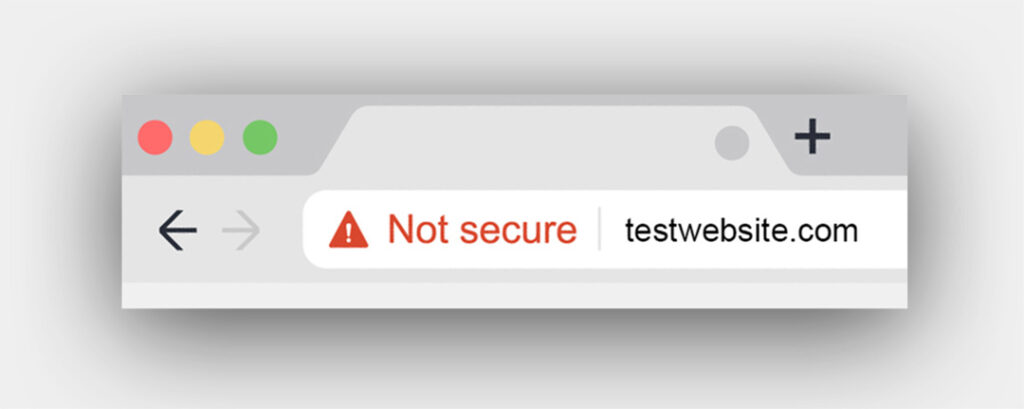
Consider this: Chrome is the most widely used of the three major browsers (the other two being Safari and Edge). The browser has an enormous 64.5% market share, meaning most of your site’s visitors will likely use it.
Would you want every visitor to see that conspicuous “Not Secure” message in their browser address bar?
But it doesn’t end there. The message will likely spook your visitors and send them fleeing from your site, resulting in a high bounce rate. A high bounce rate will mean a lower ranking, which will mean less traffic. Less traffic means you’ll have fewer visitors, which means fewer leads, and so on and so forth.
Types of SSL certificates
So, you know what SSL certificates are and why they’re important for your website and SEO. Now let’s discuss the types of SSL certificates available for your website.
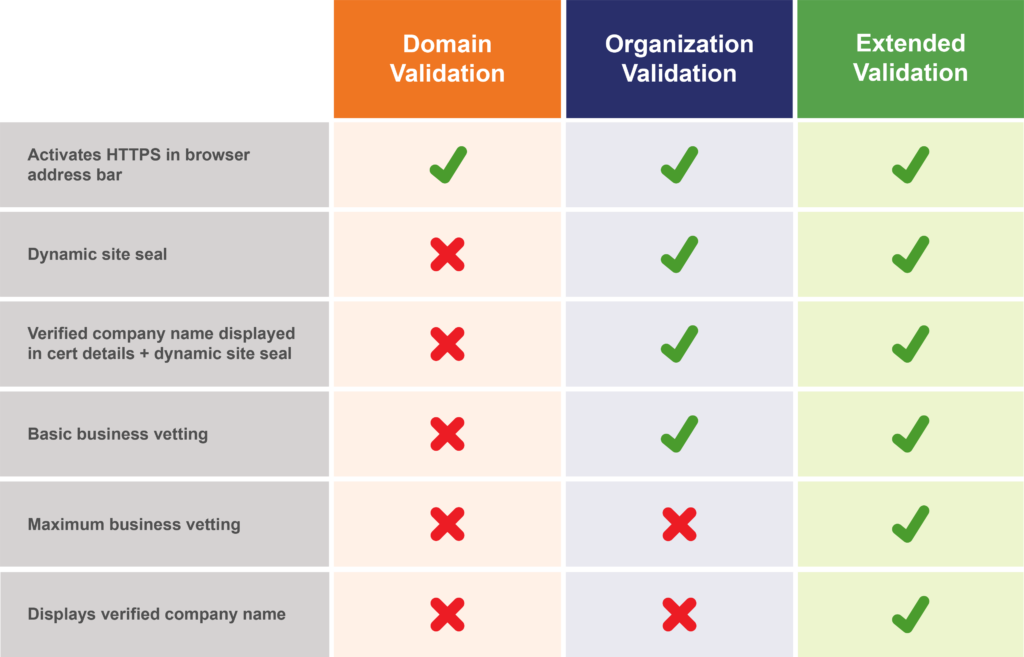
1. Extended validation certificates (EV SSL)
An extended validation certificate is the most comprehensive and expensive type of certificate you can get. While any business is free to get this certificate, it’s usually larger businesses that have them.
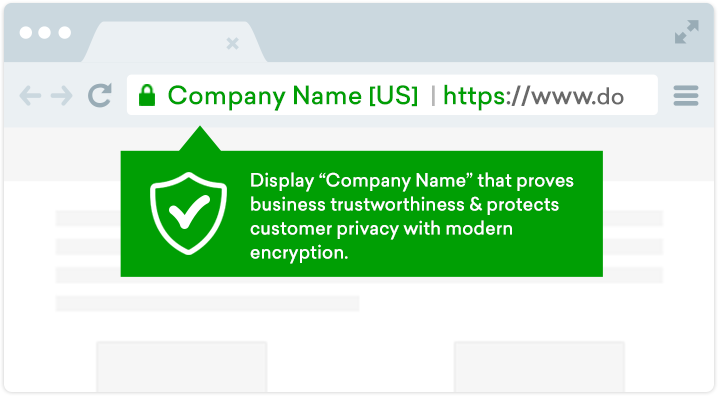
As the image above shows, this certificate displays the following information about your website in a visitor’s browser bar:
- A green padlock symbol that indicates your site is secure.
- Your business’s name.
- The country.
- https
The reason this type of certificate displays so much information is because the data helps to distinguish your website from malicious sites. And if you run websites that collect user data or process plenty of online payments, you’ll probably need these premium certificates.
Also, you’ll need to subject yourself to a standardized verification process to get this certificate. That involves proving you’re the legal holder of the domain you submit.
2. Organization-validated certificates (OV SSL)
Organization-validated certificates are a rung down the SSL certificate price ladder from extended validation certificates. Like the latter certificate, you’ll need to subject yourself to a verification exercise to obtain one. And, just like EV SSL certificates, they display information about your business in your visitors’ address bars.
OV SSL certificates encrypt data transmitted during sensitive transactions, minimizing cybersecurity risks. While not as powerful as EV SSL certificates, they’re effective enough that commercial websites use them.
3. Domain-validated certificates (DV SSL)
Compared to OV SSL and EV SSL certificates, domain-validated certificates provide a moderate level of protection from domain attacks. The verification process isn’t as stringent, so these certificates offer basic encryption.
They’re inexpensive to obtain, making them perfect for websites that don’t collect data from users (e.g., blogs and information websites).
Domain-validated certificates don’t display as much information in your visitors’ browser bar as EV SSL and OV SSL certificates. They stop short of displaying information about your business, only showing the https before your website’s URL and the padlock icon.
More SSL certificate types
Please note that the above three aren’t the only types of SSL certificates available. Some other certificate types include:
- Single-domain SSL certificate: A single-domain SSL certificate provides security for one domain. It doesn’t extend protection to subdomains or additional domains. So your single-domain certificate for yourdomainname.com won’t secure your blog.yourdomainname.com subdomain or the unique additional domain yourdomainname.net.
- Wildcard SSL certificate: These certificates are a step up from single-domain SSL certificates. A wildcard SSL certificate lets you secure your main domain and multiple sub-domains. They’re excellent for securing subdomains for mail, payments, login, and so on. Naturally, they’re more expensive than single-domain SSL certificates.
- Multi-domain SSL certificate: As its name suggests, this SSL certificate secures multiple domain names and subdomains. In addition, you can secure a mix of unique domain names, including ones that end in different extensions (i.e., .com, .net, .io, .ai, etc.). They’re also called unified communications SSL certificates.
In the section below, we’ll briefly discuss the determining factor for choosing a certificate type for your website and how to install one.
How to install an SSL certificate
By now, you should be convinced about why your website needs an SSL certificate. So how do you set one up? The process goes something like this:
- Choose your certificate: This step is easy enough as you can let the nature of your website inform your decision. A domain-validated certificate will suffice if you don’t plan to collect data from your users or accept payments online. Otherwise, you’ll need an OV SSL or EV SSL certificate (if your budget allows).
- Choose a certificate authority: You can’t install an SSL certificate without obtaining one first, and you’ll need to approach a Certificate Authority like DigiCert for that. You can get your certificate from a DigiCert reseller.
- Set up your server: Ensure your WHOIS record is up to date and matches what your Certificate Authority will have on file. Also, create a Certificate Signing Request (CSR) on your server, or get your hosting service provider to do it for you.
- Submit your certificate signing request: Forward your CSR to your chosen Certificate Authority for validation. The CA will perform company details and domain validation.
- Install your SSL certificate: When the CA gives your CSR the okay, you can install your SSL certificate (more below).
Your SSL certificate will require configuration on your web host’s server or your personal one (i.e., if you’re self-hosting your website).
Also, please bear in mind that the time it takes to obtain an SSL certificate varies depending on the type of certificate you decide to get. Whereas you can obtain a domain-validated certificate in minutes, an extended-validation certificate can take as much as a week or more to acquire.
Secure your website with an SSL certificate
If you intend to process online payments or collect sensitive data from your users, you’ll need an SSL certificate for your website. These digital certificates are crucial because they secure your website by encrypting data sent from and to it.
In addition, search engines like Google use the presence or absence of an SSL certificate to determine how well your website ranks. And the absence of an SSL certificate can impact your visitors’ user experience through off-putting visual cues.
Luckily, there are many types of SSL certificates you can use. When choosing, use your website’s security needs as the determining factor.